 Kimiko
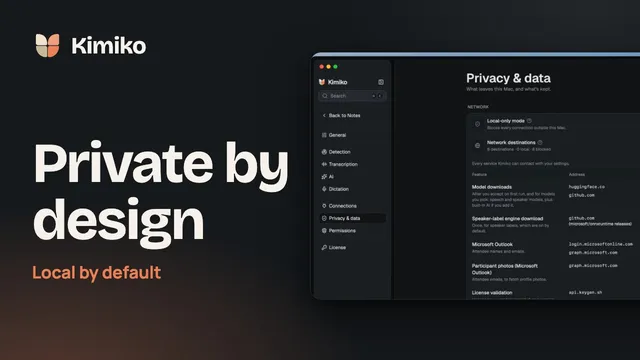
Every AI note taker says it cares about privacy. The useful question is narrower: who handles your conversation between the moment you press record and the moment you read the summary? The fewer parties, and the clearer the answer, the more private the tool.
This checklist works for any note taker, including ours. We’ve added how Kimiko answers each question at the end, with its limits next to it.
“No bot” and “private” are different things
A bot-free note taker records from your own computer, so nobody sees an extra participant in Zoom, Teams or Meet. That changes how the meeting is captured. It says nothing about where the audio is sent afterwards, who stores the transcript or whether it is used to improve someone’s models.
Plenty of bot-free tools upload the audio for cloud transcription. Some tools with a meeting bot offer strong contracts and controls. So treat “bot-free” as a convenience and a courtesy to the people on the call, then ask the questions below about everything that happens next.
The 10 questions
Professional bodies ask lawyers much the same things before they let an AI tool near client conversations. The New York City Bar’s 2025 opinion on AI notetakers points to where data is stored and for how long, whether it is used for training and whether it can be deleted. The Law Society of England and Wales adds where it is processed, who processes it and who can access it. They’re good questions for anyone with confidential conversations.
1. Where is the audio turned into text?
Transcription needs the full audio of the call, including everyone else’s voices. If it happens on a provider’s servers, that audio leaves your computer. If it runs on a speech model on your computer, it doesn’t have to.
A good answer names the place: “on your device with a downloaded model” or “on our servers in a named region, via a named provider”.
2. Where are the summary and chat answers written?
Speech-to-text and the AI that writes summaries are often separate steps. A tool can transcribe locally and still send the whole transcript to a cloud language model for the summary, the task list and every chat answer. Ask about each step on its own.
3. Where are the notes stored, and are they encrypted?
Look for a plain answer: on your computer, in the vendor’s cloud, or both. Then ask whether that storage is encrypted, who holds the keys, and whether sync to other devices is on by default.
4. Is the recording kept, and for how long?
A transcript is usually enough to work from. Keeping the audio as well means one more sensitive file to protect. Prefer tools where saving audio is a choice you make, with a retention period you can see.
5. Is your content used to train or improve models?
Check the privacy policy and terms of service for training, “service improvement” and human review. Notice whether the answer changes between free and paid plans, and whether an opt-out is on by default or something you have to find.
6. Which other companies see the data?
Many note takers are built on other companies’ speech and AI services. Ask for the list of subprocessors and what each one receives. Calendar connections, CRM syncs and sharing links each add a party too.
7. What still goes online with “local” or “offline” mode on?
Local tools still download models and updates and may check a licence. That’s normal. What matters is that the app tells you what each connection is for and that none of them carries your meetings unless you chose a cloud feature.
8. Can you check it yourself?
You shouldn’t have to take a privacy page on faith. Good signs: a settings screen that shows which model handles each step, a clear label when something is cloud-based, and a way to block outside connections.
9. Can you export and delete everything?
You should be able to export notes in an open format and delete a meeting, or your whole library, without writing to support. Ask what happens to backups and exports, which are usually separate copies.
10. How do the other people on the call find out?
A note taker that records quietly from your computer puts the job of telling people on you. Consent rules for recording vary by country and by state, and many organisations have their own policies. Say you’re taking AI notes at the start, and follow the strictest rule that applies to the meeting.
A one-page checklist
| Question | Why it matters | Where to look |
|---|---|---|
| Where is audio transcribed? | The audio holds every voice on the call | Settings for speech models, privacy policy |
| Where are summaries and answers written? | The transcript goes wherever the AI model runs | AI or model settings, list of subprocessors |
| Where are notes stored? | Storage decides who could access them later | Privacy policy, security page |
| Is audio kept, and for how long? | Recordings are the most sensitive copy | Recording or retention settings |
| Is content used for training? | Training can reuse your content beyond your meeting | Terms of service, privacy policy, plan details |
| Which companies see the data? | Every party adds its own policies and risks | Subprocessor list, integrations |
| What goes online in local mode? | Local should still be explainable | Network or privacy settings, documentation |
| Can you check it yourself? | Visible settings beat promises | The app’s own settings |
| Can you export and delete? | You keep control when you change tools | Export options, delete and wipe controls |
| Who tells the other people? | Consent rules vary by place and organisation | Your organisation’s policy, local law |
How we answer these in Kimiko
We built Kimiko for people who’d rather keep their meetings to themselves, so here are our answers, limits included. The details are in what stays on your computer.
| Question | Kimiko’s answer |
|---|---|
| Audio to text | By default, a speech model you download during setup transcribes on your computer. Cloud speech (Deepgram or ElevenLabs) is optional and asks before it is first used. |
| Summaries and chat | Built-in AI writes summaries, suggested tasks and chat answers on your computer. A cloud AI provider is optional and uses your own account. |
| Storage | Notes, meetings and tasks are kept in an encrypted database on your computer. |
| Recording | Keep session audio starts at Off, so the audio isn’t saved. You can choose a retention period if you need it. |
| Training | Local models run on your computer, so your content isn’t sent to their publisher. With cloud speech, Kimiko opts your audio out of training where the provider allows it per request; a cloud provider’s own terms apply. |
| Other companies | With local processing, no other company receives your meeting content. Calendar connections and cloud providers are optional, and each one you add receives what that feature needs. |
| What goes online | Model downloads, updates and licence checks. Anything you connect, such as a calendar, also goes online. |
| Checking it yourself | Settings → Privacy & data lists Network destinations, each marked Local or Internet. Local-only mode blocks connections outside your computer. |
| Export and delete | Export as PDF, Word or Markdown. Wipe all data removes Kimiko’s data on your computer; your exports and backups are separate copies. |
| Telling people | That part is yours. Nothing in your call app announces Kimiko, so tell people you’re taking notes. |
Local processing has trade-offs. It depends on your computer: 16 GB of RAM is a practical starting point, and larger models need more. A cloud model can still be the better choice for some work, which is why it’s an option rather than a rule. How local AI meeting notes work goes through each step.
When a cloud note taker is the right call
Cloud tools are a reasonable choice when the meeting isn’t confidential and you need things a single computer can’t do well: shared team workspaces, notes on your phone, or a bot that attends a meeting you can’t join. If that’s you, use the checklist to compare the contracts and controls on offer. Our comparison pages set out what other tools publish about this, with sources and the date we checked.
Questions
Is a bot-free AI note taker more private?
Not on its own. Bot-free describes how the meeting is captured: from your computer, with no extra participant. Privacy depends on where the audio is transcribed, where the summary is written and where the notes are kept.
Does local processing make a tool GDPR or HIPAA compliant?
No tool is compliant by itself. Keeping processing on your computer can reduce the number of companies that handle your data, which helps with many obligations, but what you must do depends on your role, your location and your contracts. Ask your privacy or compliance lead before recording sensitive conversations.
Is local AI good enough for meeting notes?
It often is, and it depends on the model and your computer. Try a short, typical meeting with your usual apps open, then check the names, numbers and decisions in the summary before you rely on it.
Do I need to tell people I’m using an AI note taker?
Usually, yes. Recording laws differ by country and by state, and many workplaces require notice either way. Telling people at the start is the simplest rule to follow.
Download Kimiko and run the checklist on it yourself. It’s free to try.
 Download for Windows